

Verified citations
Every source in the manuscript is checked against academic databases. A source that can't be found never slips in quietly: it's flagged for you.
For researchers, interface in English and Hebrew
Scriptor writes, improves, adapts and submits your research with you, step by step, with verified sources and statistics that actually run.
You decide. Scriptor does the heavy lifting.
Sources checked against





The road to publication
One citation that doesn't exist, or a retracted paper, is enough to cost reviewers' trust.
A review round brings dozens of comments, each needing a precise reply and a change in the manuscript.
Structure, length, reference style and declarations. Every resubmission starts almost from scratch.
End to end
Follow one study: from the files you bring, through verified sources and work you approve, to a deliverable you submit.
Whatever your research has produced.

Step by step, with your approval
Every source checked against the databases.
Source verified+ A retraction check for every source
Stage 1
From data and results to a full manuscript draft, or a better existing draft, with statistical analysis and verified sources.
Stage 2
Journals that fit your research, and a manuscript adapted to the structure and guidelines of the one you choose.
Stage 3
A submission package that also holds every table and every figure as a separate file, a cover letter and a list of details to complete, then portal submission only with your approval.
Stage 4
Responses to reviewers, revisions with tracked changes and a move to another journal after a rejection.
4 stages, 8 workflows
Each stage has two workflows, and each workflow says what to bring and what you'll receive. Choose a card to see the details.
Checks, statistical analysis and expert advice are not separate workflows. They are offered inside each stage when they are relevant, and run only after you approve.
A report of gaps and recommended fixes, without rewriting the manuscript. Offered, for example, on a new draft, on a journal-adapted version and before submission.
Flags style patterns, editing details and references to verify, and supports disclosure. It does not establish whether AI was used.
When you upload data, or when a reviewer or a rejection letter questions the statistics, an analysis is offered. A run starts only after you approve the analysis plan.
Ask a question at any point in the conversation. The work waits, the answer shows what it rests on, and you continue from the same point.
Statistical study planning, before any data exists, and general questions start from the text line at the top of the home page.
Getting started
One account, nothing to install.
Upload what you already have.
See the plan before any work begins.
Most deliverables are ready in 10 to 20 minutes. You can close the page; turn on notifications and we'll let you know when it's ready.
The interface
The conversation, the deliverables, the sources and the analyses. Captures from the actual interface, with a fictional sample study.
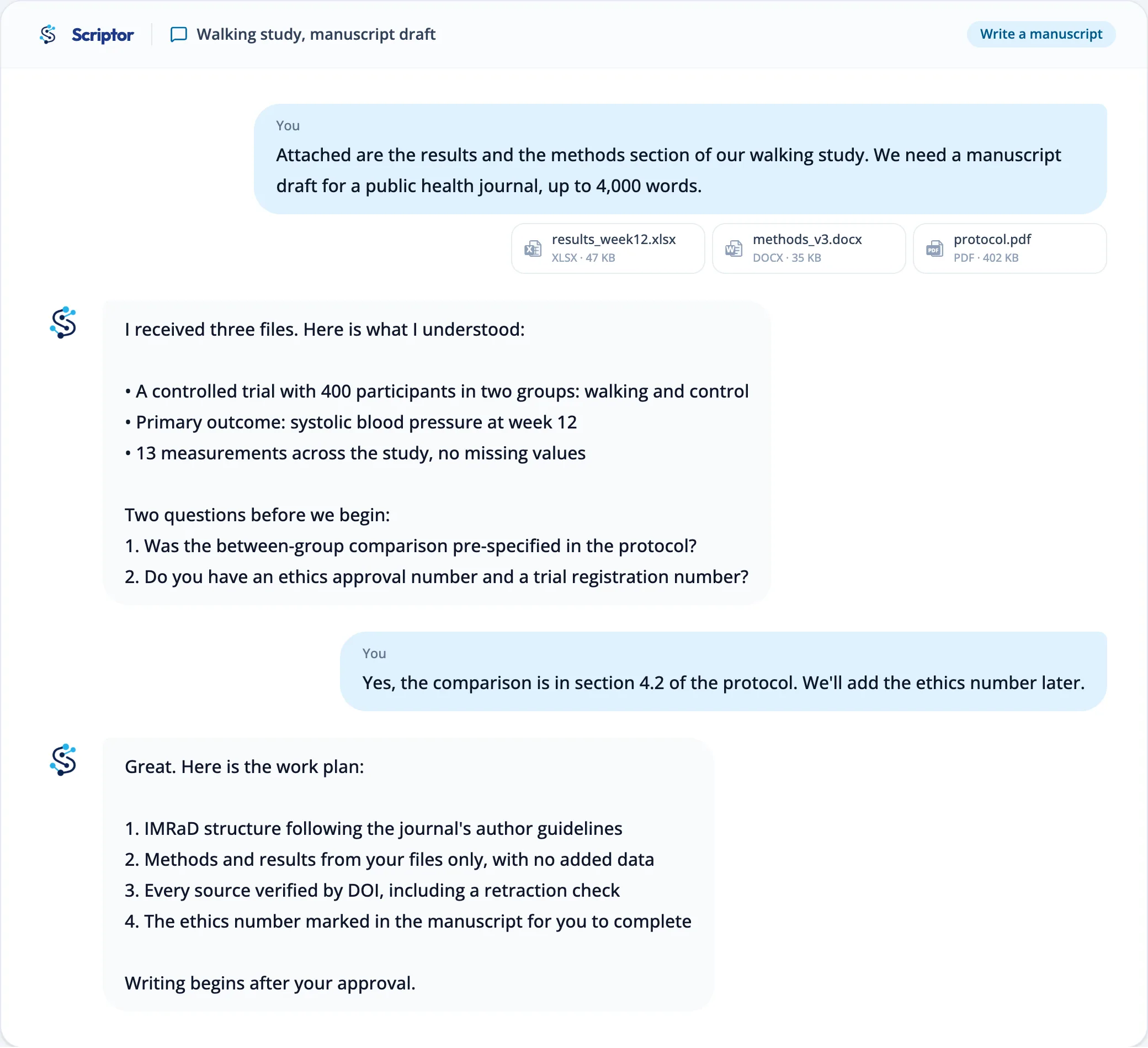
Checks, not promises
4stages, from the first draft to resubmission.Scriptor doesn't invent sources or guess results. Anything it can't verify is flagged for you.
Every source in the manuscript is checked against academic databases. A source that can't be found never slips in quietly: it's flagged for you.
Analyses run only after your approval, and results arrive as tables and figures ready for the manuscript.
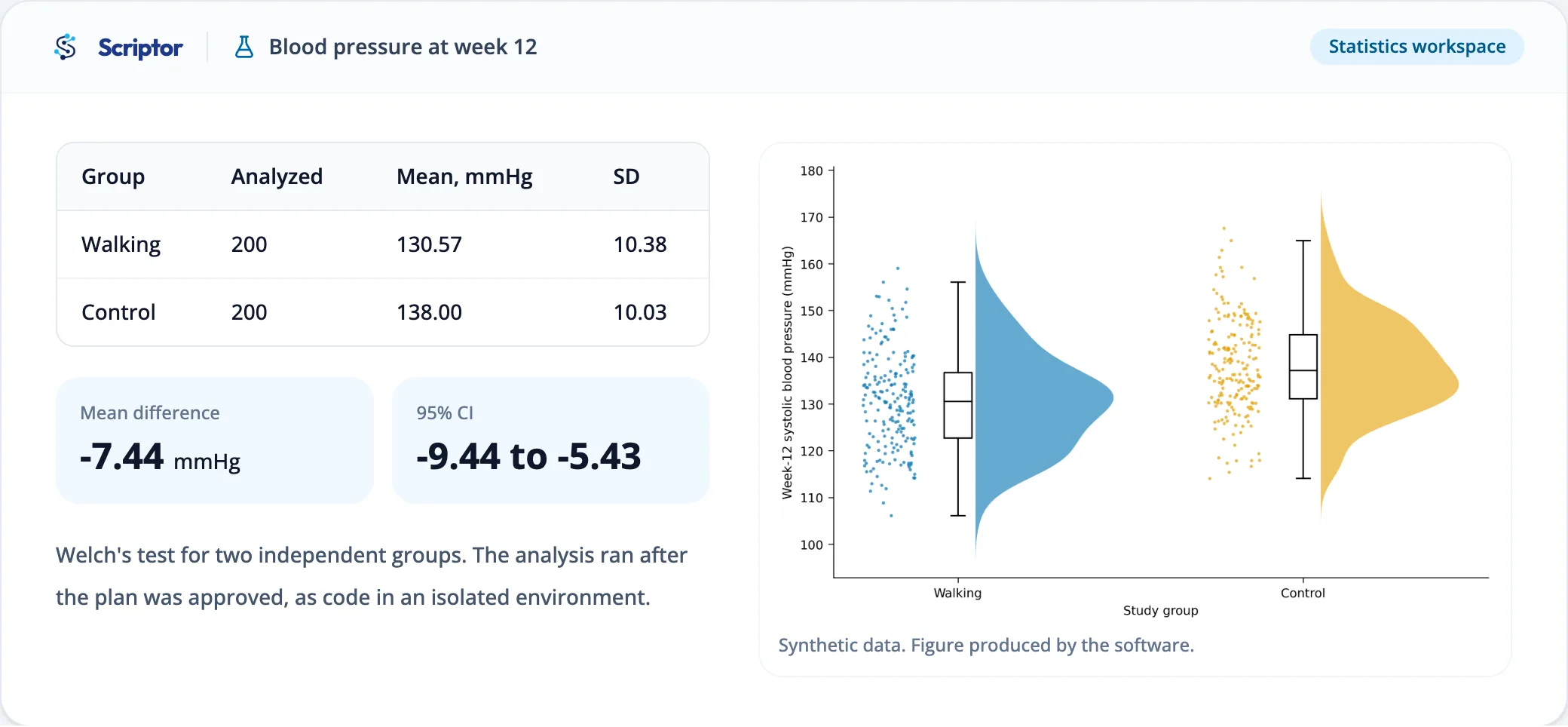
Your manuscript stays open beside the conversation and updates as the work runs. Every change is marked, with a note that explains why it was made; accept or reject each one, and go back to any version. Select a passage and tell the expert what to change in it.
Privacy
Traffic is encrypted, and your files sit in private storage with an owner check on every read.
Data files are deleted automatically 90 days after upload, with reminders 7 days and 1 day before.
Anthropic, OpenAI and Google, which process your materials, don't train models on them. Exception: the Mem0 preference memory may use excerpts, per the policy.
Request an export or deletion of your data from account settings, at any time.
Built for researchers in Israel
Work in Hebrew, submit in English. Scriptor knows both worlds.
Get startedEvery screen, question and explanation, fully in Hebrew.
Right now we support English-language manuscripts only. Questions, explanations and reports stay in Hebrew.
Invite research partners and work on the same project.
Questions
Not by the main model providers. Anthropic, OpenAI and Google, which process your materials, do not train models on content sent through their commercial APIs. One exception: the Mem0 memory service, which keeps writing preferences, may use the excerpts it receives to improve its product and train models, as the privacy policy explains.
You, and anyone you choose to invite to a conversation or share a link with. Files are kept in private storage, and every read is checked against the owner. On our side, access is limited to the service operator.
Each journal and institution sets its own rules on AI use and disclosure, so follow their policy. The AI writing patterns check is offered inside the stages; it reviews your draft and gives disclosure guidance, taking your target journal into account if you name one. It does not determine whether AI was used.
Nothing. The pilot is free for invited users. Each account has a monthly usage allowance; when it runs out, new work waits until it renews, and your conversations and files stay available.
English. Right now we support English-language manuscripts only; a manuscript in another language is stopped before any work on it starts. The interface and the conversation are available in Hebrew and English, and when writing a paper from scratch your materials can be in any language.
Most deliverables are ready in 10 to 20 minutes. You can close the page and turn on notifications, and we'll let you know when it's ready.
Writing a manuscript from scratch supports quantitative studies: randomized and non-randomized trials, cohort, case-control and cross-sectional studies, laboratory and animal experiments, surveys, diagnostic accuracy studies and prediction models. Qualitative studies, case reports, systematic and narrative reviews, meta-analyses, protocols and editorials are not supported in this workflow.
Scriptor is currently open to a small group of researchers. Register, choose a stage and start with what you already have.